Synchro 4D - Construction Management
Duration: 20 hours
Teaching Methodology: Hands on
Course Schedule: Schedule
Fees: $400
Course Mode: Blended – Face-to-face or online via Zoom

|

|

|

|
DESCRIPTION
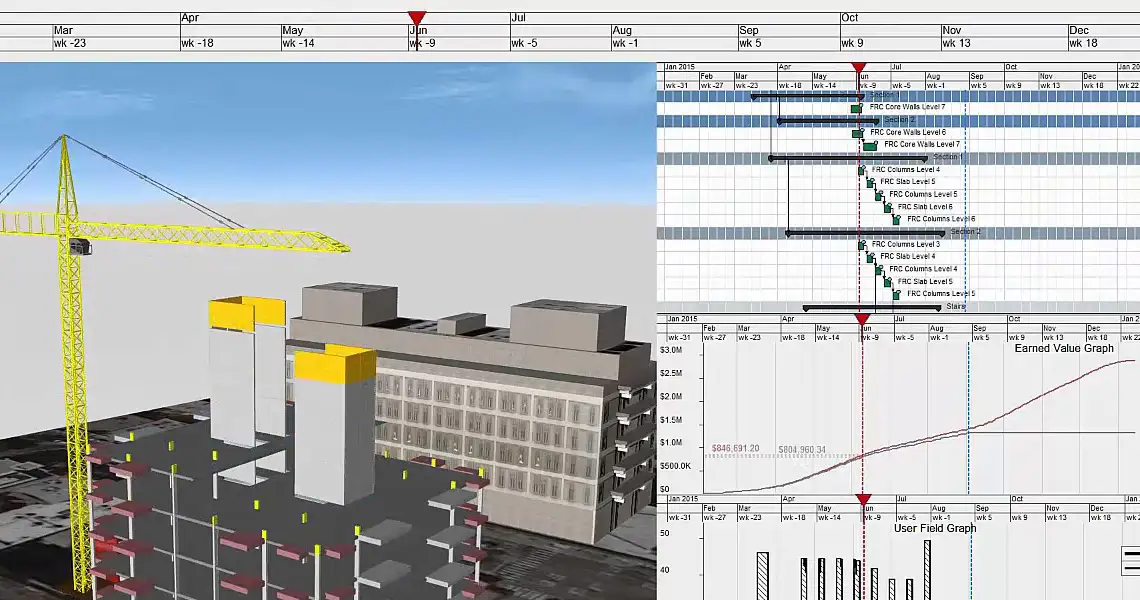
This course is about 4D BIM. By 4D BIM, we mean adding the time element to the 3D model – scheduling. You will learn to use Synchro to import models from Revit and other software, create new tasks, link the 3D objects to tasks, add equipment, generate schedules, animate construction simulations, analyze and optimize project tracks, and create reports.
PREREQUISITES
Experience with planning projects using MS Excel.

COURSE CONTENTS
01 - Workspace Layout
- Quick Access Toolbar
- Ribbon
- Toolbars
- Gantt Chart
- 3D Window
- 3D Objects
- Resources
- Resource Groups
- Task Properties
- Resource Properties
- 3D View Properties
- Resizing Windows
- Undocking and Relocating Windows
- Reset layout
02 - Importing schedules and modules
- Quick Access Toolbar
- Ribbon
- Toolbars
- Gantt Chart
- 3D Window
- 3D Objects
- Resources
- Resource Groups
- Task Properties
- Resource Properties
- 3D View Properties
- Resizing Windows
- Undocking and Relocating Windows
- Reset Layout
03 - Linking process
- Resource Selection
- Cancelling Selection
- 3D Filters
- 3D Object Filter
- Appearance Profiles
- Basic Linking Process
- Correcting Resource Assignment Mistakes
- Linking Options
- Saving and Opening Projects
- Review
- 4D Review
- Select Assigned Tasks from an Object
- Select Assigned Resources from a Task
04 - Creating new tasks
- Inserting New Tasks Manually
- Editing Durations
- Adding Logic Links
- Model-Based Scheduling
- Updating the tasks schedule
- linking tasks
05 - Custom appearance profile
- Transparency Interpolation
- Growth Simulation
- Modifying the active appearance
- Resource Groups
06 - 3D subdivisions
- Subdivide by Slice
- Subdivide by User Slice
- Subdivide by Freehand
- Troubleshooting
- Editing Subdivisions
- Subdivide Multiple Objects
07 - User fields and Automatching
- Creating a user field
- Creating an Auto-Matching Rule
- Using the custom filter
- Auto-Match Resources to Tasks
08 - Adding equipment & Editing 3D objects
- Importing Equipment Models
- Appearance Profiles for Equipment
- Move and Rotate (Simple Transform Manipulator)
- Using the simple manipulator
- Move, Rotate, and Scale (Advanced Transform Manipulator)
- Using the advanced transform manipulator
- Align
- Select the equipment and assign Edit as Assigned
09 - 3D path
- Create 3D Path
- Assign 3D Path to a Resource
- Edit 3D Path
- Using the keyframe
10 - Copy and create 3D objects
- Copy & Paste
- Creating Objects
- Changing the 3D object colors
- Changing properties
11 - Synchronizing 3D models
- Optimizing 3D Synchronisation
- Export
- Import
- Guides
- File name
- Synchronising 3D Models
- Identifying 3D Object Changes
12 - Baselines and synchronizing schedules
- Creating a Baseline
- Synchronising Schedules (Programmes)
- Synchronise
- Consolidate
- Integrate
- Following the flowchart
- Compare Baselines using 3D Views
13 - Cutting planes & Viewpoints
- Creating a Cutting plane
- Creating a viewpoint
- Using the 3D View Property Details
- Saving a viewpoint
14 - Creating an animation
- Creating an Animation
- Editing the Animation
- Interpolation
- Exporting an Animation
- AVI Resolution
- Animation Content
15 - Output
- Save as an Image
- Printing the Gantt Chart
- Export 3D PDF
- Schedule Health Check Report
Related Project Management Courses
This Synchro 4D course is part of ETC's project management & quantity surveying training program in Lebanon. Explore the other courses:
Learning Outcomes
After completing this course, participants will be able to:
- Understand the role of Synchro in 4D BIM and construction planning.
- Import and organize 3D models for construction simulation.
- Link project schedules to model elements.
- Simulate construction sequences and progress scenarios.
- Create visual reports and 4D animations for project stakeholders.
Recommended Learning Path
For a stronger project management and construction workflow, we recommend the following path:
- Microsoft Excel Beginner to Advanced
- Primavera P6 Training for Beginners
- Primavera P6 Professional for Engineers
- Quantity Surveying & Estimation
- Synchro 4D Construction Management
Related Project Management Courses
This course is part of ETC's Project Management and QS training department in Lebanon. Explore related courses:
Frequently Asked Questions
What will I learn in the Synchro 4D course?
You will learn how to use Synchro to integrate 3D models with scheduling tasks (4D BIM), simulate construction activities, optimize workflows, and export animations and reports.
Is this Synchro course suitable for beginners?
Yes, it is ideal for engineers, planners, and BIM professionals with basic project planning knowledge or Excel skills.
Is the course offered in person or online?
You can attend the Synchro course at ETC Training Center in Lebanon or join live via Zoom in a blended learning format.
How long is the course and what is the cost?
The course lasts 20 hours and costs $400.
Do I receive a certificate?
Yes. Participants receive a certificate of completion from ETC Expertise Training Center, attested by the Lebanese Ministry of Education.